
What’s a date picker?
A date picker is an easy way to introduce a date/time into an input field. It definitely gives a professional look to your forms by simplifying the process of selecting a specific date or a range of dates. In most cases, it popups the moment you hover over the input or click on an icon next to it, and shows a calendar with the available dates that you can input. It’s very convenient if you want to check on what date it would be a specific day of the week.
I hope that the following list will help you in selecting a script that will offer a better experience to your website’s visitors. JQuery and MooTools are some of the well known libraries used to create the date pickers.
 1. The jQuery UI Datepicker is an excellent script that supports multiple themes and can be used in specific formats. Here are some examples:
– date range restriction
– alternate field population
– display month and year menus
– display button bar
– display multiple months
– show datepicker when clicking a date icon
[Go to Project Page | View Demo]
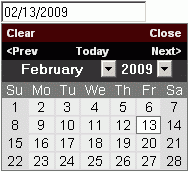 2. jQuery Datepicker is a plugin that attaches a popup calendar to your input fields or shows an inline calendar for selecting dates. It’s a simplified version of the JQuery UI Datepicker.
Features include:
* works as a popup for an input field or inline in a div/span
* full keyboard equivalents
* Predefined date formats are available. You can even define your own format.
* Minimum/Maximum date restriction
* Update an alternate field with the date in a different format
* Select a range of dates
* Show week of the year / days from other months
* Callbacks on hover, change of month/year, selection and closure
* CSS Customizable
* Language selector


